
Programmatic tool calling lets Claude write a Python script that calls your tools inside Anthropic’s code execution sandbox, so tool results land in the script instead of the model’s context. It pays off when one turn fans out to many calls or returns bulky data, and it costs money on short sequential turns, so turn it on per tool and keep writes direct. We cover what the API does, the published numbers on both sides, the integration rules that break naive clients, and how we split tools between code and conversation.
What changes when Claude calls tools from code
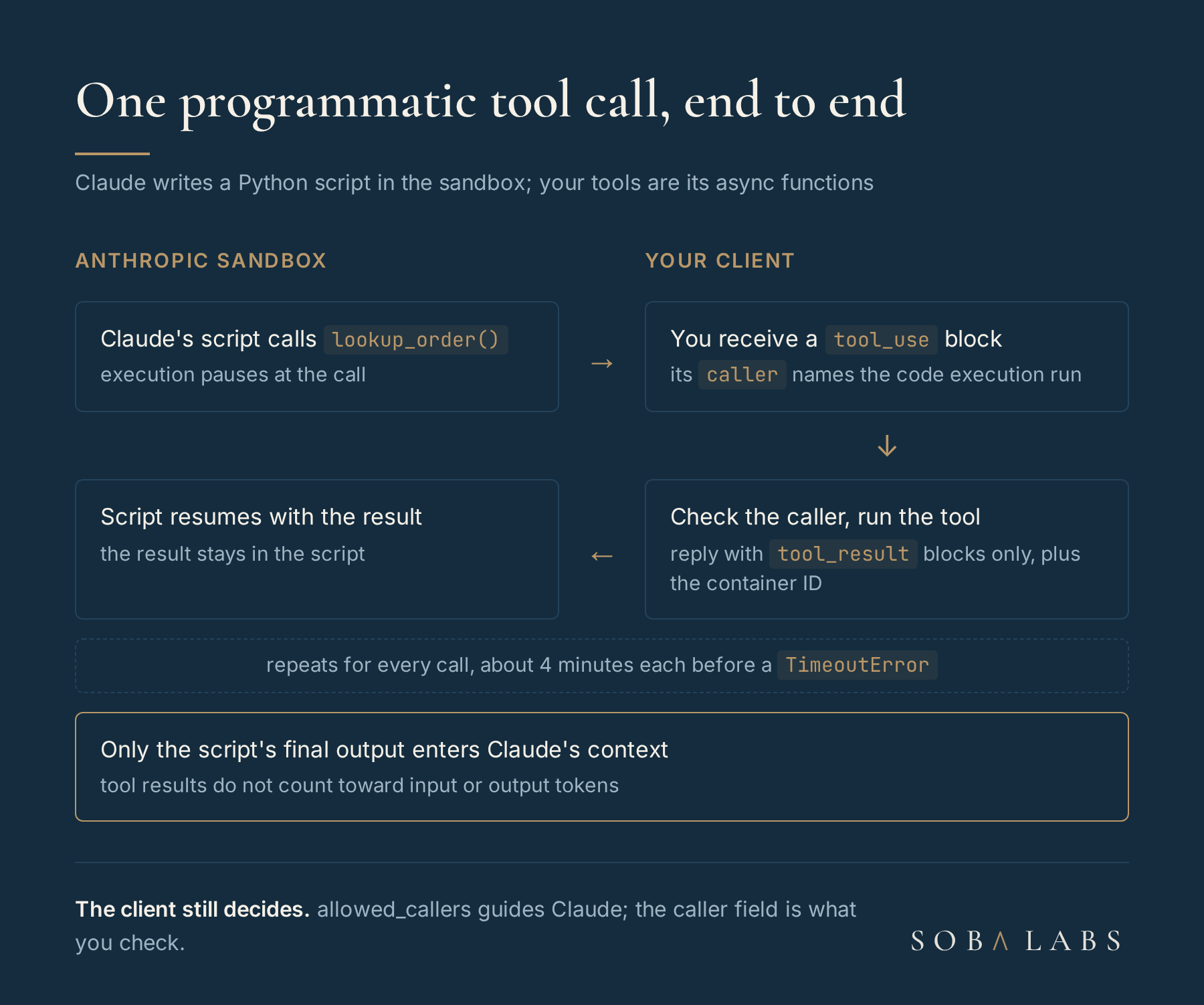
In classic tool calling, every call is a round trip: Claude emits a tool_use block, your client runs it, and the full result goes back into the conversation. Twenty lookups mean twenty model passes and twenty results in the context window, wanted or not. Programmatic tool calling replaces that loop with a script. According to Anthropic’s programmatic tool calling docs, your tools are exposed to Claude’s code as async Python functions, and when the code calls one, execution pauses and the API hands you an ordinary tool_use block to run.
The docs state that tool results from programmatic calls are not added to Claude’s context and do not count toward input or output token usage; only the script’s final output does. The script can loop, filter, join and run calls in parallel with asyncio.gather, and the model is not re-sampled between calls inside one execution. The code execution tool runs that script in a sandboxed container with Python 3.11, 1 CPU, 5 GiB of RAM and no internet access, so the only way out of the sandbox is through the tools you exposed.
The token savings are real and conditional
Anthropic published numbers on both sides. On its 75-tool project-management benchmark, enabling the feature “reduced billed input tokens by roughly 38 percent with no change in task accuracy.” On τ²-bench, where each turn makes one or two sequential tool calls, scores were unchanged and cost went up about 8 percent; the docs sum it up as “Sequential single-call workflows do not benefit.” Across production API traffic, requests carrying 10 to 49 tool definitions see typical savings of 20 to 40 percent.
| Workload | Published result | Source |
|---|---|---|
| 75-tool project-management agent | about 38% fewer billed input tokens, same accuracy | Programmatic tool calling docs |
| τ²-bench, one or two sequential calls per turn | same scores, about 8% higher cost | Programmatic tool calling docs |
| Production requests with 10 to 49 tools | typical savings of 20% to 40% | Programmatic tool calling docs |
| Complex research tasks (launch, November 2025) | 43,588 to 27,297 tokens on average, a 37% cut | Anthropic’s advanced tool use post |
The launch post points the same way. Internal knowledge retrieval rose from 25.6% to 28.5%, and its expense example shrinks 200KB of raw line items to 1KB of results. Those numbers date from November 2025, so treat them as evidence that the mechanism works and look to the docs for current figures. The current docs put the gain on agentic search benchmarks at an average of 11 percent with 24 percent fewer input tokens.
The rule we take from this: the saving comes from data that never reaches the model. A turn that fans out or returns bulky results gains; a turn where Claude must read each result before choosing the next call gains nothing and pays for the container.
The docs list three weak fits, and we see all three in agent work. Strictly sequential chains, where each call depends on Claude reasoning over the last result, cannot skip the round trip. A handful of small calls on the first turn of a conversation can cost more in container startup and script generation than they save. And tools that need a person’s feedback between calls belong in the conversation, where a tool approval step can see each one.
We add a fourth case of our own, anything that writes. A script can fire a batch of calls before anyone reviews it, so refunds, emails, ticket updates and database writes stay on ["direct"]. Reads that fan out, such as looking up 40 orders or checking 50 endpoints, go to code. The docs also advise picking one caller per tool instead of allowing both, which this split does.
allowed_callers guides Claude and blocks nothing
allowed_callers is the per-tool switch: omit it and the tool is direct only, set it to ["code_execution_20260120"] and Claude is guided to call it only from code. The important word is guided. The docs say the field “is not a hard API-level block on direct calls”, and close the note with “Do not rely on allowed_callers as a security boundary.”
So your client still owns the decision. Every tool_use block carries a caller field, {"type": "direct"} or the code execution type plus the tool_id of the run that made the call. Check it before you execute, and refuse a write that arrives from code even if your config says it cannot. We drew the same lesson in MCP security in production, and it holds here: the policy belongs in your agent harness.
A separate section of the docs, on validating tool results, adds a second risk. Results reach the script as strings that can contain code or commands, so a tool that returns user input or external data carries code injection risk whenever the script interprets or runs that output. Parse such results as data and never pass them to eval or a shell.
The integration rules that break a naive client
A client written for direct tool calls will hit four rules the first time a script pauses. We wire them like this, with the Anthropic Python SDK:
tools = [
    {"type": "code_execution_20260120", "name": "code_execution"},
    {**lookup_order, "allowed_callers": ["code_execution_20260120"]},
    {**refund_order, "allowed_callers": ["direct"]},  # writes stay direct
]
resp = client.messages.create(model=MODEL, max_tokens=4096, tools=tools, messages=msgs)
while resp.stop_reason == "tool_use":
    calls = [b for b in resp.content if b.type == "tool_use"]
    results = [run_checked(c) for c in calls]  # checks c.caller first
    msgs += [{"role": "assistant", "content": resp.content},
             {"role": "user", "content": results}]  # tool_result blocks only
    resp = client.messages.create(model=MODEL, max_tokens=4096, tools=tools,
messages=msgs, container=resp.container.id)- Results only. While programmatic calls are pending, the user message that answers them may hold only
tool_resultblocks, with no text even after them, and each result’s content must be a string or text blocks; images and documents are rejected. - The container ID is required. A continuation with pending programmatic calls and no container ID is rejected, and the
toolsarray must be the same as the original request so the paused code can resume. - About four minutes per call. A pending call times out after about 4 minutes and raises a
TimeoutErrorinside Claude’s code, which Claude usually retries. A slow tool behind a script needs its own timeout well under that; our agent timeout notes cover the general shape. - 90 seconds per cell. Each Python cell has a 90-second wall-clock limit, which
code_execution_20260521now spells out in the tool description so Claude can budget long cells.
Rate limits do not shrink either: each call from code counts individually, so a script that fans out to 200 lookups is 200 calls against your limits.
Strict tools, MCP connectors and forced calls stay direct
Several combinations are unsupported. Tools with strict: true from structured outputs cannot be called programmatically, so a tool that relies on guaranteed structured output for its inputs stays direct. You cannot force a programmatic call through tool_choice, and disable_parallel_tool_use: true is not supported. Tools that come through an MCP connector cannot be called from code, and neither can the computer use and browser use toolsets. A custom tool whose input_schema has a recursive $ref fails with a 400 when enabled for code, while the same schema works for direct calls.
Model support is broad but not universal. The docs list the current Claude 5 models plus Opus and Sonnet from 4.5 on, and say Claude Haiku 4.5 accepts the newer code execution versions but does not support programmatic tool calling. Check capabilities.code_execution.supported in the Models API before you route a request, the same way our reasoning effort comparison recommends validating effort levels per model.
It falls outside zero data retention and HIPAA readiness
Check this before the feature reaches a regulated workload. It runs in code execution containers, and Anthropic’s API and data retention page marks it eligible for neither zero data retention nor HIPAA, with container data kept for up to 30 days. The two arrangements fail differently. Under ZDR the request still goes through, and the page says plainly “Using them is a choice to step outside your ZDR arrangement for that specific data.” A HIPAA-enabled organization gets a 400 error naming code_execution instead. So a HIPAA compliant AI workload cannot use programmatic tool calling at all, and a ZDR workload can only by taking that data outside its agreement.
The bill is the code execution bill. Per Anthropic’s pricing page, code execution is free alongside the web_search_20260209 or web_fetch_20260209 tools or later; otherwise each organization gets 1,550 free hours a month, then $0.05 per container hour, with a 5-minute minimum per execution. That minimum is one more reason short turns are a poor fit.
LangChain’s example pins an older tool version
ChatAnthropic supports the feature from langchain-anthropic 1.3.0. The LangChain Anthropic integration docs show the pattern: add the code execution tool to the tool list, mark tools with extras={"allowed_callers": [...]}, and set reuse_last_container=True so follow-up calls keep their container. That page’s example still uses code_execution_20250825, while the Claude docs require code_execution_20260120 or later for programmatic calls and describe the 20250825 version as Bash and file operations. Pin the newer version string in both the tool and allowed_callers, and check the request your agent sends. The rest of a LangChain create_agent setup stays as it is.
Our Search Console filter kept 33 of 231 rows
We apply the same discipline outside the Anthropic API. The topic for this post was picked by an agent that reads our Search Console data. The 28-day export ran to 231 query rows, about 39 KB of JSON; a few lines of code kept the 33 rows sitting at positions 8 to 20, about 3.5 KB, and only those reached the model. The model never needed the other 198 rows, so it never saw them. The row that won was the query this post answers.
That is the test we apply before turning the feature on: does this turn return data the model would throw away, or fan out to calls it would make blindly? If yes, the tool goes to code. If Claude has to read each answer to pick the next call, it stays direct, and prompt caching does more for that turn’s cost, as we covered in prompt caching in production. Then we measure billed input tokens with and without allowed_callers on a sample of real traffic, as the docs recommend, because that number settles it for your tools.
The takeaway
Programmatic tool calling is a context and latency budget tool for fan-out reads: Anthropic’s own figures run from 38% fewer input tokens on a 75-tool agent to 8% more cost on turns of one or two sequential calls. Put read-heavy tools behind allowed_callers, keep writes direct, check the caller field in your client because the switch is not a security boundary, answer paused scripts with tool results only and the container ID, and keep it away from data that must stay under zero data retention. If you are tuning the same agent’s spend from the other side, our notes on halving Claude Code token usage show the filtering idea at the shell.